Handheld/Portable
SxD
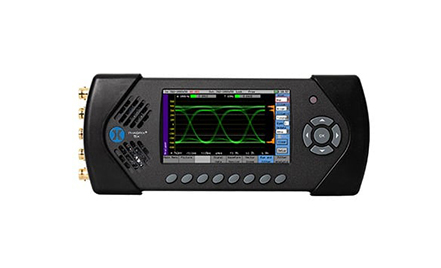
Portable dual-link 3G/HD/SD-SDI Generation, Analysis & Video/ Audio Monitoring
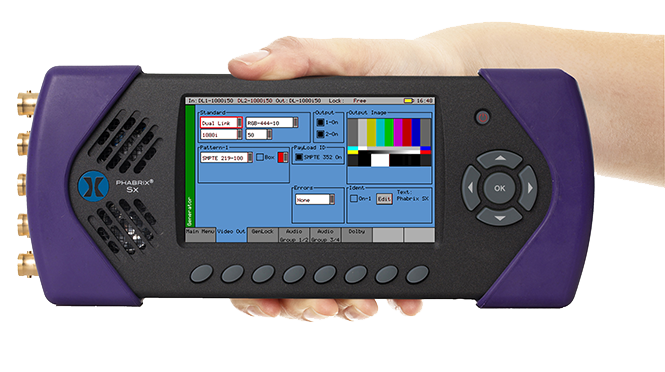
Dual SDI Input/Output Analysis
The SxD is a dual-link 3G/HD/SD-SDI instrument which is designed for video technology manufacturing and production applications. It has two SDI inputs, two SDI outputs and no AES input or outputs. It offers support of multiple advanced video standards up to a combined maximum data rate of 3Gbits across the two SDI links, including 422/444, YUV/RGB, 10/12 bit and SMPTE 428-9 D-Cinema/SMPTE ST 2048-2:2011 formats.
The SxD also now offers automatic link detection of single links of multi-link 3G and HD based UHD formats.

Key features

EXTENSIVE VIDEO TOOLSET
With simultaneous signal generation and analysis, its built-in core toolset includes a multi-format waveform, vectorscope and video display, plus data view and VANC/ANC inspector. Over 350 formats are supported for compliance monitoring. Signal generation offers 32 test patterns, including pathological.

MULTI-CHANNEL AUDIO ANALYSIS
The SxD features support for 16-channel audio metering and bitstream generation and analysis of Dolby E, Dolby Digital and Dolby Digital Plus.

AV DELAY GENERATION AND ANALYSIS
AV Delay Generation and Analysis offers an end-to-end solution for the measurement of Audio to Video differential delay through a broadcast system. The tool provides a realtime update of the differential delay between the video content and the selected audio channel pair to measure the propagation (latency) or pipeline delay.

ULTRA PORTABLE, RUGGED DESIGN
The SxD offers great mobility with a lightweight, rugged aluminium case with integral, high quality screen for instrument display and video monitoring. The generator/ analyzer operates via rechargeable lithium battery for up 2 hours, and can also be powered by the mains.

ENHANCED REMOTE CONTROL
The SxD features a TCP/IP interface for remote control, automated testing, engineering support and fault analysis. Comprehensive status logging with custom reports, together with instrument picture capture to simplify fault finding is also included.

FAST, INTUITIVE OPERATION
With its color coded GUI that simplifies signal and instrument selection, the Sx Series of generation, analysis and monitoring instruments offer unmatched ease of use for busy engineers who need to diagnose faults and assure compliance quickly.
Toolsets
SxD Generator

Video Generator
- The Sx can create video test signals for all supported SD and HD SDI output standards including the 3GHz standards at 1080p/50/59/60 Y, Cb, Cr
- Advanced video formats include support for RGB, XYZ 12bit and 2K formats
- A fully programmable Y Zone Plate

Audio Generator
- The Sx can embed an audio signal on all 16 embedded audio outputs
- The Audio Group menu controls which audio channels are present, signal type and amplitude
- Choice of: silence, adjustable tone, noise, AV Delay, Dolby test stream or AES input

Reference Generator
- The Sx instrument can create video test signals that are either free-running or locked to a studio reference or input signal
- The Genlock menu is used to select the locking reference and provides a control for genlock phase offset in lines and pixels
- User control of Free Run frequency with +/- 100ppm pull range for SDI interface acceptance checking

AV Delay Generation
- Adapted EBU Tech 3305 AV Sync and Operational Test Pattern to support SD and HD formats
- Compatible with third party AV delay analysers e.g.:LAWO V_pro8
- Enable AV Delay audio on up to 16 embedded channels and/or AES out

Adv. Video Formats
- Optional Software Licence | Order Code: PHSXOF
- 3G level A and B
- 4:2:2 YUV, 4:4:4 RGB and 4:4:4 YUV at 10/12 bit and XYZ at 12 bit
- 2048 x 1080 (2K) SMPTE ST 428-9 and digital cinema 2048-2:2011

Adv. Zone Plate
- Optional Software Licence | Order Code: PHSXOZ
- Choice of Zone Plate, Grating or Sweep Patterns
- Sophisticated control set including: Start and End Frequency, Start Phase, Rate of change of Phase, Angle, and X and Y position
- Temporal control is particularly useful for testing image processors and compression codecs
SxD System

Instrument Presets
- Current settings in the Sx instrument can be saved as memories for future recall
- Memories can be exported to a single file, reimported or copied to other units
- Presets can be applied to the whole instrument or selectively within the Generator or Analyzer

Network Configuration
- The Network menu allows the Sx instrument to be configured as part of a network
- Support for automatic acquisition of network parameters via DHCP or manual configuration
- Remote control enable/disable and selection of port number

Software Status
- Serial number, Sx instrument MAC address, version information and battery state listed
- The date and time can be set and factory default settings recalled
- Display of loaded license options
- LCD brightness and screen saver configurations

Engineer Setup
- Manage the Sx's settings including user access, clearing memories, factory default reset, software upgrades and audio calibration
- SDI input to SDI output loop through mode
- Control of SDI to IP-SFP gateway in Sx TAG

Utils
- Details of the unit's operating status
- Details the temperature and individual board voltages
- Lists any hardware errors that have been recorded

Enh. Remote Control
- Optional Software Licence | Order Code: PHSXOR
- This option allows complex applications to be created on a PC to perform automated test and measurement functions
- PHABRIX instruments act as a server and listen on a port waiting for incoming requests from a client
- All visual controls on the product have an associated command

Command Scripts
- Optional Software Licence | Order Code: PHSXOS
- The savings in time and the ability for an engineer to run a script to check equipment and return with a report is invaluable
- Create a stack of commands for repeat testing of systems using the toolsets within the Sx series by user defined operator name
- Command scripts can be created on the interface or created offline on a PC
HTML Reporting
- Optional Software Licence | Order Code: PHSXOS
- When ‘run’ reports are generated, they auto fill an on-board html file that can then be downloaded via the remote control facility and printed as a hard paper copy. The report also collects screen dumps of the instruments to accompany the report if required
- Users can add their own logo to personalize the reports
SxD Analyzer

Picture Monitor
- The picture is displayed in a window as a down-converted display
- A cursor may be turned ON over the area of the picture specified by the specified line and sample
- Monitor device input or output

Picture Zoom
- Zoom function provides a 1:1 unfiltered pixel view, centred on the position of the picture cursor
- HANC/VANC areas visible when cursor in blanking

Linked Cursors
- The picture cursor is linked to waveform, vectorscope and data views for rapid and accurate detailed measurement of the signal

Waveform Full Frame
- Displays selected analyzer or generator source
- Analog locking reference input view (TAG only)
- YCbCr GBR, Y, Cb, Cr, R, G, B modes
- Cursors may be displayed over the waveform to allow measurement of time or amplitude values
- Vertical and horizontal magnifications
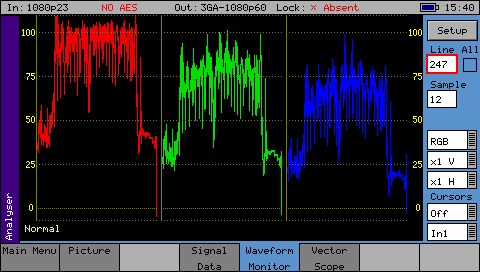
Waveform Line Select
- The display may be restricted to a single line or all lines may be displayed at the same time
- The single line display is linked to the picture, vectorscope and data view
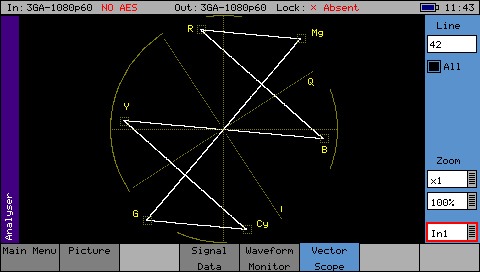
Vectorscope
- Choice of 100% or 75% graticules
- Display the Composite, SDI, SFP video input or the generator test pattern
- Display a specific video line linked to picture cursor
- x1, x2, x5 or x10 magnifications with position to centre, cyan, yellow, green, magenta, red, blue graticule locations
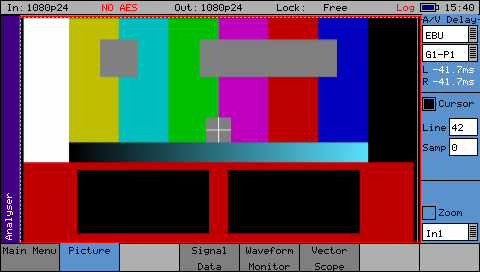
AV Delay Analysis
- Optional Software Licence | Order Code: PHSXO-AVD
- Support for adapted EBU Tech 3305 AV Sync and operation test pattern
- Support for LAWO V_line AV Sync test pattern
- Real time update of measured AV delay
- +/- 400ms operating range
- Select audio from SDI or AES input
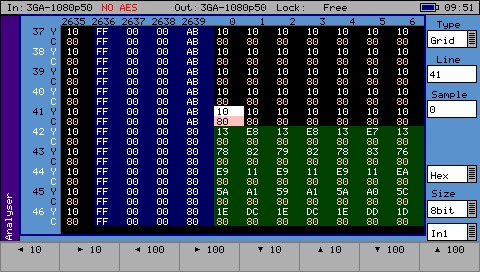
SDI Data Display
- Optional Software Licence | Order Code: PHSXOSD
- This instrument provides a detailed view of the data words contained within the SDI stream
- This is particularly useful when debugging complex faults or in an R&D environment
- Cursor link for locating chosen packet in data view/picture windows
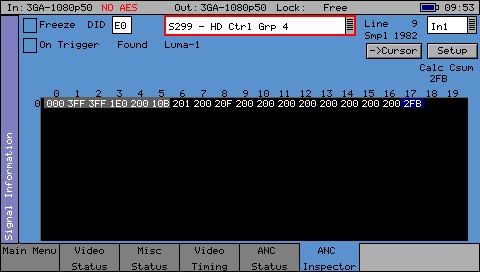
VANC/ANC Inspector
- Optional Software Licence | Order Code: PHSXOSD
- This instrument provides a detailed view of the ancillary data (VANC and ANC) packets
- The ancillary packet analyzer also includes a DID or SDID search editor, freeze and freeze on trigger function
- User-definable trigger parameters include: DID and SubDID values, line number range, Checksum, DBN, Parity and ANC Gap Errors
SxD Signal
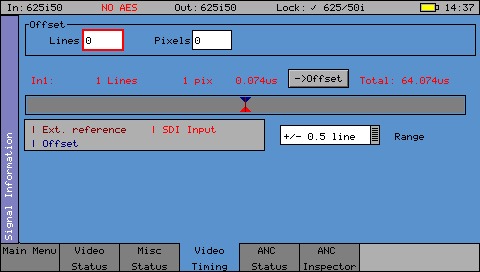
Video Timing
- Display the relationship between the selected video input with respect to the external reference input
- Offset feature to simplify system timing measurements
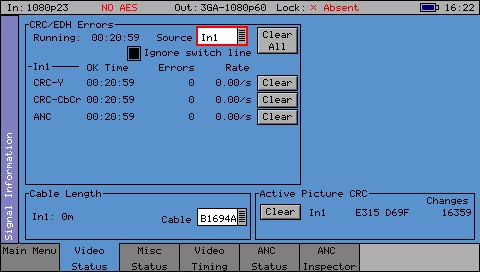
Video Status
- Display the status of the selected video input or output and any errors that have been found in the data stream
- Display of EDH, Active Picture and CRC data with a cumulative run-time display of errors and error rate
- Display of estimated cable length for SDI inputs with selectable cable type

ANC Status
- Shows which ANC packets are present on the SDI input and whether any errors have been detected
- Each field is color coded according to whether the ANC packet is present (White), missing (Grey), has errors (Red), or has previously had errors (yellow)
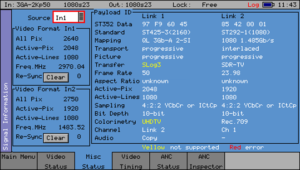
Video Format/Payload
- The updated Misc Status menu provides an easy to read side by side status view of SMPTE 352 Video Payload Packets (VPID) embedded in the selected video input and displays any errors that have been found
- Support single links of multi-link 3G and HD based UHD formats
- Selection of input or output for rapid comparison
- Display of raw data and decoded form
SxD Control

Screen Grab
- Screen grabs can be saved and downloaded via a web browser or FTP transfer

Web Browser
- View and control the instrument display over a TCP/IP interface with a standard browser
- Ideal for remote location checking, engineering support, and fault analysis
- Allows access to key functions including screen dumps, loudness files and logging files
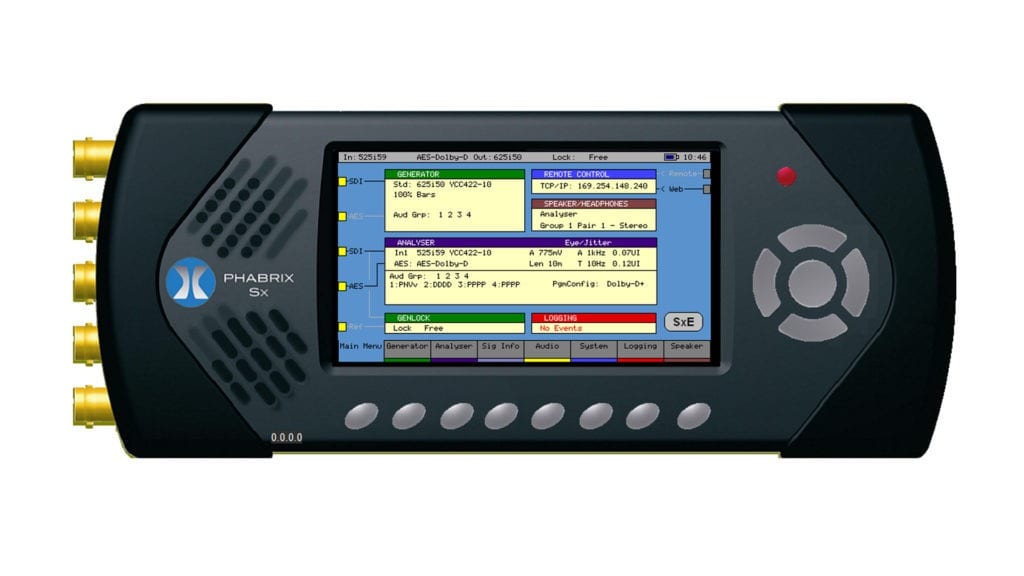
PC Simulator
- A free Sx simulator PC application is available on the PHABRIX website
- Indicates command IDs for automation programming
SxD Logging
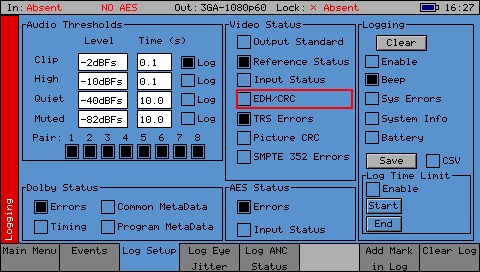
Log Setup
- Set Audio Thresholds and log specific video status events, including Output, Reference and Input Status, TRS Errors, Picture CRC

Event Log Display
- The Event Log menu displays a list of events with a time stamp showing when they occurred
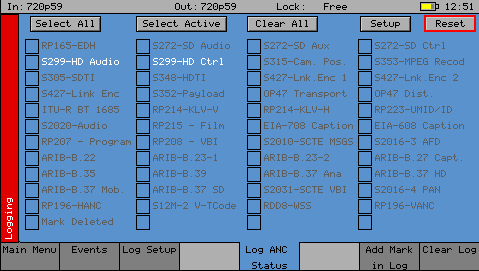
ANC Log Setup
- The Log ANC Status menu allows customization of which ANC packets to log for changes in status (e.g. Present, Checksum Error, Missing, Parity Error)
- Logging of Dolby and AES Status as well as device system errors
- Control of logging duration
SxD Audio

16 Channel Metering
- Display up to 16 audio channels
- The source for each block of 8 meters may be independently set to allow metering of embedded audio inputs or outputs
- The current audio level in dBFs (decibels relative to 0dB full-scale) is displayed at the bottom of each meter
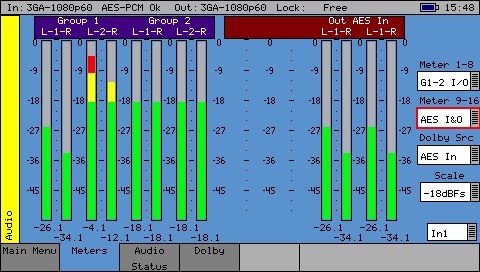
AES/Analog Meters
- AES and Analog (TAG) audio metering available as an alternative to embedded audio
- Dolby E metering selection
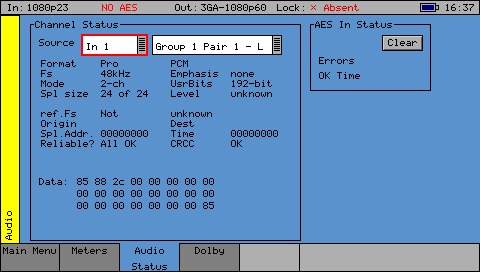
Audio Channel Status
- The Audio Status menu shows the Channel Status for the selected audio channel
- Displayed in decoded form as well as a raw hexadecimal data dump
- The source may either come from the input signal or from the generator output for rapid comparison purposes

Dolby Status
- Optional Software Licence | Order Code: PHSXO-DAG
- Dolby Audio bitstream Analysis for Dolby E, Dolby Digital and Dolby Digital Plus
- The main menu window provides a clear and easy to read status of the detected type of audio in each group with a snapshot of the Dolby program config. and Dolby E guard band timing
- All Dolby related metadata parameters can be logged
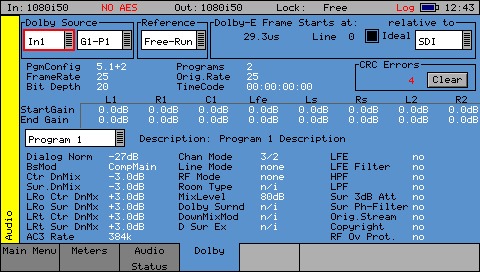
Dolby Analyzer
- Optional Software Licence | Order Code: PHSXO-DAG
- Display of stream type, metadata of a selected audio stream, PA spacing and any CRC errors.
- Dolby E SDI timing relationship with indication of the recommended line position
- Logging triggers for errors relating to Dolby Audio include CRC errors, timing, and common and program metadata

Dolby Generator
- Optional Software Licence | Order Code: PHSXO-DAG
- This toolset provides pre-configured Dolby Audio test bitstreams for Dolby E, Dolby Digital and Dolby Digital Plus.
- Engineers can then adjust both Dolby E, the metadata parameters, and the Dolby E line number to test broadcast infrastructure and downstream audio encoding equipment
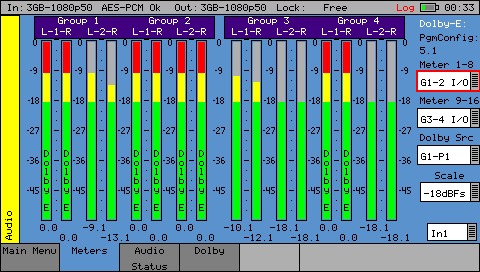
Dolby Metering
- Optional Software Licence | Order Code: PHSXO-DAG
- The detected Dolby Audio type is displayed in the audio meters
- Dolby Audio is not decoded
- Dolby E metering is provided
Specifications
Monitor Details
| Specification | Value |
|---|---|
| Display resolution | 480 x 272 pixels auto scaling |
| Display type | 16:9 24 bit color TFT |
| Display size | 95 x 54 mm |
| Processing | All digital |
Video
| Specification | Value |
|---|---|
| SDI | 3G-SDI, HD-SDI SD-SDI |
| Outputs/Inputs | 1 x 75 Ohm BNC |
| Genlock | Bi/Tri/SDI with cross lock |
| Adjustable timing | 0 to 1 Frame |
| Text Ident | Yes with font, color and point size |
| Logo ident | Yes |
| EDH | Yes (SD-SDI) |
Video Test Signal
| Specification | Value |
|---|---|
| Resolution | 10 bits |
| Static Test patterns | 32+ including full frame |
| Moving Zone Plate | Yes |
| User defined | DPX,YUV,TGA,BM |
| Formats | To be supplied on request |
| Eye bit rates | 3Gbps, 1.485Gbps, 270 Mbps |
| Jitter | SMPTE specification filters |
| Jitter thermometers | Alignment, Timing |
Audio
| Specification | Value |
|---|---|
| Internal speaker | 0.5 watts |
| Audio DAC | 24 bit stereo |
| Headphone socket | 3.5 mm with auto line out |
| Generator/Monitor | 48 kHz 20-bit (SD-SDI) 24-bit (HD-SDI) |
| 16 channel embedded audio | Yes |
| AES Output/Input | N/A |
Audio Test Signal
| Specification | Value |
|---|---|
| Fixed tones | 17 |
| Variable tones | 1 Hz-24 Khz in 1Hz steps |
| Intermittent Tone | Yes |
| White noise generation | Yes |
| Audio levels variable | 0 to -100dB in 1dB steps |
| Audio phase invert | Yes |
General
| Specification | Value |
|---|---|
| Navigation panel | 5 menu keys 8 custom select/program |
| Integral battery supply | Yes |
| Internal Storage | 8GB (upgradable) |
| Remote control | Web browser interface |
| Ethernet/USB | Yes |
| Carry case | Included |
| AC power supply | Included |
| Security | Kensington lock fitting |
| Size/Weight | 0.7kgs, H:92mm W:225mm D:42mm |
Ordering information
SxD
| Code | Description |
|---|---|
| PHSXDL | SxD Handheld Instrument – SD/HD/3G Handheld complete unit (Includes PHSXOF as standard) |
Software Options
| Code | Description |
|---|---|
| PHSXO-AVD | AV Delay Analysis – Analyser supports EBU and LAWO AV delay sequences |
| PHSXOS | * Command Scripts + Reports – Repeat testing + create print report |
| PHSXOSD | * SDI Data display + VANC/ANC Inspector – Detailed SDI data display |
| PHSXOR | * Enhanced Remote Control – TCP/IP sockets based remote control |
| PHSXOZ | * Zone plate generator – Programmable zone plate generator |
| PHSXO-DAG | * Dolby E/D/D+ analysis + generation – Dolby streaming, metering, timing |
| PHSXO-ENG | Engineering bundle (*) – PHSXOS,PHSXOSD,PHSXOR,PHSXOZ,PHSXOF,PHSXO-DAG (price includes 40% discount) |
Accessories
| Code | Description |
|---|---|
| PHSXWM | Sx Wall mounting bracket for easy charging (does not include the charger) |
Extended Warranty
| Code | Description |
|---|---|
| PHSXD-3YEAR | SxD Upgrade from 1 to 3 Year Warranty |
| PHSXD-5YEAR | SxD Upgrade from 1 to 3 Year Warranty |
*One year warranty included as standard